
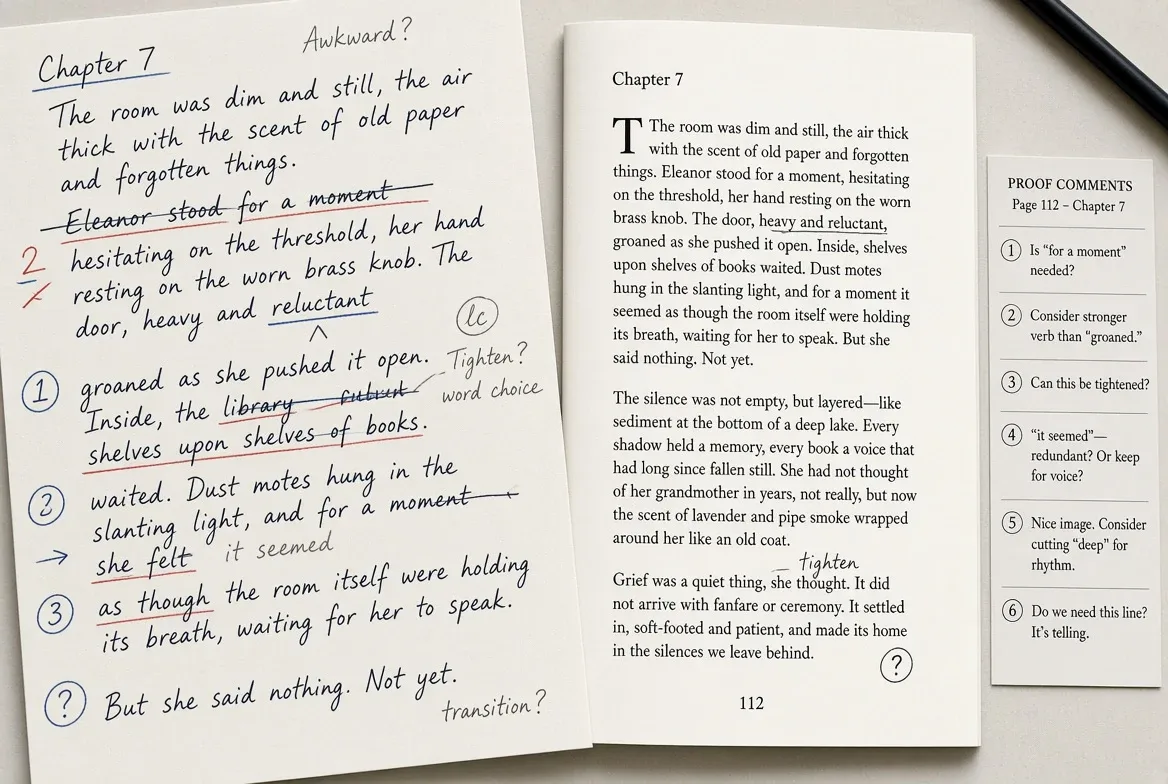
A book manuscript is edited in two separate markup systems, not one: Track Changes inside Word or Google Docs during copyediting, then a different set of digital proofreading marks inside a PDF viewer once the text has been typeset. The switch happens because a proofreader is checking a finished page, not still rewriting sentences.
That handoff — from a live, editable file to a locked, designed page — is the hinge the whole editing process turns on. It shapes which software an editor opens, how a publisher budgets for each pass, and why a change that was trivial in Word becomes a formal request once a book is laid out.
The vocabulary shifts along with the tools. A copyeditor working in Track Changes can still delete a sentence outright. A proofreader working on a typeset PDF generally cannot — a query gets routed to the typesetter as a comment, and if an author or editor later reverses a proofreading fix, the industry shorthand for restoring the original wording is "stet," Latin for "let it stand." That distinction between editing a live file and annotating a finished one is what separates the earlier passes from the last one.
What Does Track Changes Actually Record During Copyediting?
Track Changes, Microsoft's revision-tracking feature, logs every insertion, deletion, and formatting change a copyeditor makes to a manuscript and attributes each one to the person who made it. Deletions are marked with a strikethrough and additions with an underline, with each contributor's edits assigned a distinct color so an author or a second editor can see who changed what.
Word gives reviewers several ways to look at the same markup. Simple Markup shows a red line in the margin next to any edited line; All Markup displays the actual struck-through and underlined text in each reviewer's color; No Markup previews the document as if every change had already been incorporated; Original strips the tracked edits away entirely. An editor can step through changes one at a time with Next and Previous, click an individual edit to accept or reject it, or use Accept All Changes and Reject All Changes to clear an entire pass at once.
This is the tool a developmental editor and a copyeditor both work in, and it stays a live, revisable file the whole time — which is exactly what changes once the book leaves their hands.
Why Do Proofreaders Switch to PDF Markup Instead of Track Changes?
Proofreading happens later, after the copyedited manuscript has been converted and formatted for publication in a page-layout program such as Adobe InDesign, according to CMOS Shop Talk, the Chicago Manual of Style's own editorial blog. At that stage the document is no longer a manuscript file an editor can open and rewrite — it is a designed page, and proofreaders mark up a PDF of it rather than editing it directly.
The practical reason is that a PDF comment is not a change to the file itself. As CMOS Shop Talk puts it, markup added in a program like Adobe Acrobat "can simply be deleted or revised rather than stetted" — the typesetter applies it to the actual layout file, and the proofreader's annotation stays a separate, removable instruction rather than a permanent edit sitting inside the design.
Acrobat's commenting tools double as documentation: every mark a proofreader makes on the page also appears as an entry in a running comments list in a side panel, which a typesetter can work through in order and check off as each fix is applied. Traditional proofreading symbols — carets for insertions, underlines, deletion marks — get built the same way digitally, using Acrobat's Draw, Replace Text, Highlight, and Insert Text tools. A proofreader can still print the PDF, mark it by hand, and scan it back in, but doing so gives up the searchable text and the automatic comments list that make the digital workflow faster to execute.
How Much Does Each Stage of Editing Cost?
Rates vary by genre and subject matter, but the Editorial Freelancers Association publishes ranges by type of edit that track the sequence above: developmental work costs the most per word, copyediting sits in the middle, and proofreading — the fastest pass, run in the fewest revisions — costs the least.
| Stage | Typical rate per word | Typical hourly rate |
|---|---|---|
| Developmental editing | 4.0¢–7.8¢ | $50–$95 |
| Copyediting | 2.0¢–5.0¢ | $40–$75 |
| Proofreading | 1.0¢–4.5¢ | $35–$65 |
The EFA notes that academic, medical, and legal manuscripts command premiums at every stage, while general fiction tends to price at the lower end of each range.
How a Manuscript Actually Moves From Word to Print
- Developmental edit. Big-picture revision — structure, argument, pacing — still happens inside the working manuscript file, usually in Word or Google Docs.
- Copyedit. A copyeditor works line by line in the same live file, with Track Changes recording every insertion, deletion, and formatting fix and attributing it to them.
- Design and typesetting. The corrected manuscript is laid out in a page-design program such as InDesign, becoming a fixed page for the first time.
- Proofread. A proofreader reviews a PDF of that laid-out page in Acrobat, marking corrections as comments rather than reopening the original Word file.
- Corrections applied. The typesetter works through the comments list and updates the layout file directly; the proofreader's markup is then discarded, not merged.
Frequently Asked Questions
Can a proofreader still mark up a printed page by hand instead of using Acrobat? Yes — printing the PDF, marking it with a pen, and scanning it back in remains a working method. It gives up two advantages of the digital route: the page's searchable text and the automatic, checkable comments list a typesetter can work through in order.
Why doesn't Track Changes work once a book has been typeset? Because the manuscript is no longer a single editable file at that point — it's a designed page inside a layout program. A PDF comment leaves that page untouched and lets the typesetter, not the proofreader, decide how to apply the fix.
What software do publishers typically use for copyediting versus proofreading? Copyediting runs in Word or Google Docs with Track Changes on; proofreading runs on a PDF export of the typeset page, marked up in a tool like Adobe Acrobat rather than in the original manuscript file.
Why does proofreading cost less per word than copyediting or a developmental edit? Per the Editorial Freelancers Association's published rate ranges, proofreading is the fastest of the three passes and typically the last one before publication, which is reflected in per-word and hourly rates that run lower than copyediting or developmental editing.
For a related craft perspective, read What a Developmental Edit Actually Costs Authors in 2026.
For more context, read Complete Guide to Comic Book Collecting for Beginners.
For more context, read How Much Freelance Book Editing Really Costs in 2026.
For more context, read Papers that get harsher peer review may end up more cited.